The US Cybersecurity and Infrastructure Security Agency added CVE-2026-65400 to its Known Exploited Vulnerabilities catalog on August 18, 2026. Apple had released fixes on August 6 for macOS Sonoma, Sequoia and Tahoe. The flaw can allow an attacker on the network to authenticate to Screen Sharing without valid credentials.
The Netherlands National Cyber Security Centre (NCSC-NL) reported active abuse on multiple systems where port 5900 was reachable from the internet; attackers obtained root access and installed a Monero miner on each system. The advisory does not state how many systems were involved or establish the worldwide scale of exploitation.

Three macOS branches have documented fixes
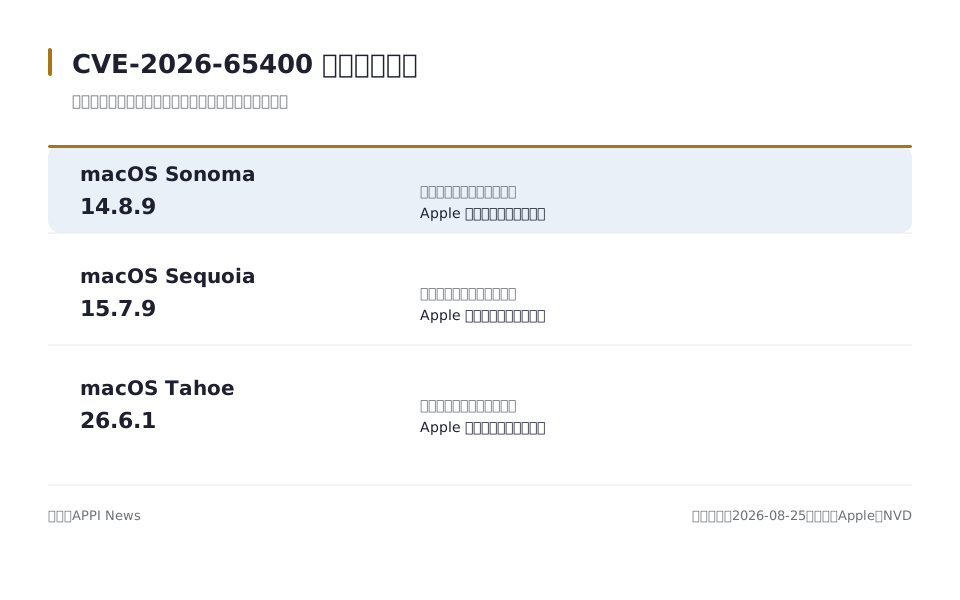
Apple identifies macOS Sonoma 14.8.9 as the fixed Sonoma release. The company identifies macOS Sequoia 15.7.9 as the fixed Sequoia release, while its Tahoe notice identifies macOS Tahoe 26.6.1 as the fixed Tahoe release. All three notices carry an August 6, 2026, release date and say improved state management addressed the authentication issue.
| Installed macOS branch | Documented fixed release |
|---|---|
| macOS Sonoma | 14.8.9 or later |
| macOS Sequoia | 15.7.9 or later |
| macOS Tahoe | 26.6.1 or later |
These are minimum fixed versions for the three named branches, not a complete list of every macOS release Apple supports. APPI News could not verify from the cited security notices whether an older branch received a separate fix. A Mac running an older branch therefore needs a compatibility check through Apple or the organization that manages the device.
Observed exploitation matters more than one severity label
The US National Vulnerability Database (NVD) displays a Common Vulnerability Scoring System (CVSS) 3.1 score of 9.8 supplied by the CISA Authorized Data Publisher (CISA-ADP). Its vector describes a network attack of low complexity that needs no privileges or user interaction, but the same page says NVD has not provided its own assessment. NCSC-NL lists 7.1 using a vector that assumes low privileges and narrower impact, so the two published scores are not interchangeable.
The catalog entry and the Netherlands cases establish active exploitation independently of that scoring difference. NVD records the US CISA decision as “active” exploitation with an automatable attack and total technical impact, while the Netherlands report documents root access and miner installation on exposed systems. Those records support prompt remediation without treating either score as a prediction for an individual Mac.

Check the installed version and run Software Update
Apple says the Apple menu's About This Mac window shows the installed macOS name and version number. Record both before starting the update, then compare the number with the fixed release for that branch. A later compatible release also contains the earlier branch update.
Apple directs Mac owners to Apple menu > System Settings > General > Software Update and recommends making a backup before installing new software. Software Update offers only software compatible with that Mac model. Apple also says installation may restart the Mac several times and may show a progress bar or blank screen.
- Open About This Mac and record the macOS branch and full version number.
- Open System Settings > General > Software Update, allow the compatibility check to finish and install the offered security update or later release.
- Keep the Mac awake and do not close a laptop lid while installation is running.
- After the final restart, open About This Mac again and confirm that the version meets or exceeds the fixed release in the table.
An organization-managed Mac may receive updates on an administrator's schedule or show controls that the user cannot change. Record the displayed version and contact the organization's IT or security team instead of removing management profiles. A message that no compatible update is available needs follow-up if the installed branch is below the documented fixed version.

Turn off Screen Sharing if the update must wait
Apple's Mac User Guide places the control at Apple menu > System Settings > General > Sharing and says other computers on the network cannot connect to the Mac when Screen Sharing is off. Turning the service off removes that connection path while an update is pending. It does not patch CVE-2026-65400 or show whether a connection occurred earlier.
The same guide says Screen Sharing and Remote Management cannot be enabled at the same time. Apple's CVE notices name Screen Sharing; they do not state that CVE-2026-65400 affects Remote Management. Managed-device owners should ask their administrator which remote service is enabled instead of assuming the two controls have the same vulnerability.

An update does not clear evidence of an earlier intrusion
The NCSC-NL cases show that successful exploitation can lead to root access and software installation. A Mac that exposed port 5900 before it was fixed, or that now shows unexplained accounts, files or sustained processor use, needs more than a version check. Disconnecting that Mac from the network and handing it to an organization's incident-response team preserves the option for a controlled review.
A US CISA bulletin says its Binding Operational Directive 26-04 requires US federal agencies to check for pre-patch compromise in designated scenarios. That directive governs US federal agencies, not Mac owners worldwide. The narrow lesson for other organizations is that installing a fix changes the current software but does not determine what happened before installation.
Frequently asked questions
Which Macs need the documented update?
A Mac on Sonoma below 14.8.9, Sequoia below 15.7.9 or Tahoe below 26.6.1 is below the fixed release documented for its branch. Install the compatible update offered by Software Update and confirm the version after restart.
Does a Mac still need the update when Screen Sharing is off?
Turning Screen Sharing off closes that service's network connection path, but it does not alter the vulnerable system component. Installing the compatible fixed release prevents the setting from becoming an unpatched entry point if the service is enabled later.
Does installing the update prove the Mac was not compromised?
No. The update fixes the authentication issue from that point forward, while an earlier intrusion can leave accounts, files or running software behind. A previously internet-exposed or suspicious managed Mac needs review under the organization's incident process.
Why do published CVSS scores differ?
The CISA-ADP and Netherlands NCSC records use different assumptions about required privileges and impact. Cite the provider with the score, and use the confirmed exploitation reports when setting remediation priority.
Sources and further reading
- About the security content of macOS Tahoe 26.6.1(Apple Support)Apple's fixed Tahoe release, release date, impact statement and state-management fix.
- About the security content of macOS Sequoia 15.7.9(Apple Support)Apple's fixed Sequoia release, release date, impact statement and state-management fix.
- About the security content of macOS Sonoma 14.8.9(Apple Support)Apple's fixed Sonoma release, release date, impact statement and state-management fix.
- CVE-2026-65400 Detail(US National Vulnerability Database)The CVE description, CISA-ADP score and vector, affected version ranges, and CISA KEV entry.
- Security Advisory NCSC-2026-0280(Netherlands National Cyber Security Centre)The report of active exploitation on internet-reachable systems, root access and Monero miner installation.
- Find out which macOS your Mac is using(Apple Support)Apple's path for finding the installed macOS name and version number.
- Update macOS on Mac(Apple Support)Apple's Software Update path, backup advice and installation behavior.
- Turn Mac screen sharing on or off(Apple Support)Apple's Screen Sharing settings path and the effect of turning the service off.
- CISA releases Binding Operational Directive 26-04 on prioritizing security updates based on risk(US Cybersecurity and Infrastructure Security Agency)The scope of the US federal directive and its requirement for pre-patch compromise checks in designated scenarios.