
As of August 29, 2026, Google said one family manager could link up to five other people through a single family group. The roster can support YouTube, Google One and Google Play, but each service applies separate eligibility, sharing and exit rules.
A family group is the membership layer, not a bundle that activates every family subscription. YouTube adds a same-address requirement, Google One has a separate plan-manager role, and Google Play checks whether each purchase qualifies for Family Library.

One manager and five members fill the group
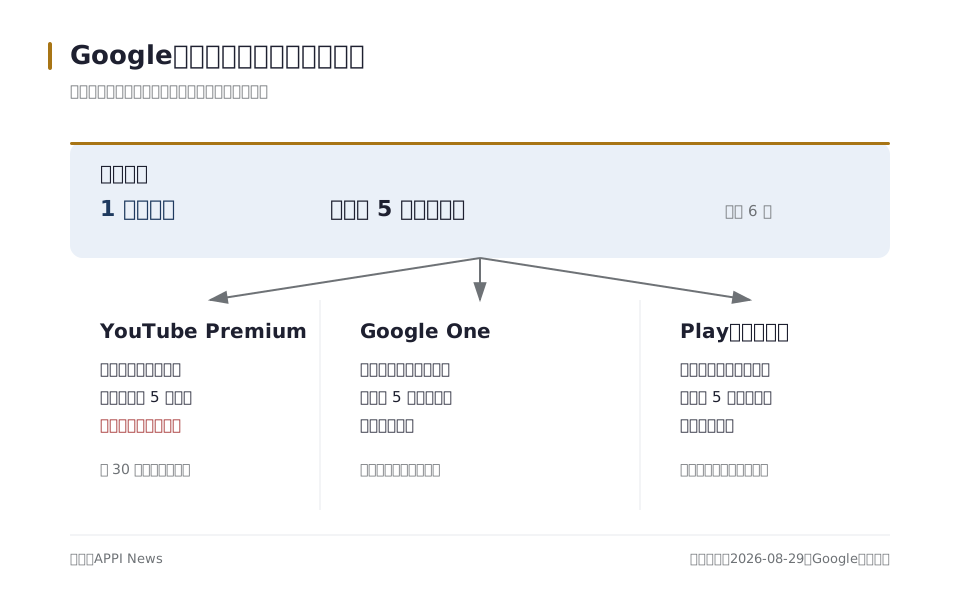
Google caps a family group at one manager and five members, and pending invitations count toward the six-person limit. The invited person gains access to family services only after accepting the email or text invitation.
The account holder who creates the group becomes its family manager and can add or remove members, choose family services, manage the family payment method and delete the group. Google directs the manager to sign in, open g.co/YourFamily, select Create a family group and send invitations.
A member must use a personal Google Account, live in the same country as the manager, belong to no other family group and have made no family-group switch in the previous 12 months. Work, school and other organization-managed Google Accounts cannot join.
Members may see one another's names, profile photos and email addresses; a family manager also receives receipts for purchases made with the family payment method. Google One storage use is visible within the group, but files are not shared unless their owner shares them separately.
One roster does not bundle three services
Google lists YouTube Premium, Google One and Google Play Family Library among the services that can use a family group. Each product still has its own purchase or activation process, qualifying conditions and consequences when a member leaves.
| Service | What may be shared | Separate rule |
|---|---|---|
| YouTube Premium or Music Premium | Paid membership benefits for the manager and up to five members | Every member must live at the same residential address as the manager |
| Google One | Storage and eligible member benefits | The Google One plan manager turns on sharing and can be different from the family-group manager |
| Google Play Family Library | Eligible purchased apps, games, movies, television programs, e-books and audiobooks | Eligibility depends on the item, payment method, content category and country |
Joining the roster therefore does not prove entitlement to any particular subscription or purchase. The relevant product page remains the controlling source for plan availability, price and included benefits in each country.
YouTube requires one residential address
YouTube says a family manager can share a paid membership with up to five people who live at the same residential address. Members sign in with separate Google Accounts and keep individual libraries, subscriptions, recommendations and viewing histories.
YouTube's setup guide says an electronic check confirms the residential-address requirement every 30 days. The company does not identify the signals, weighting or account-level pass criteria, so APPI News could not verify how a particular member will be assessed.
Only the Google family manager can buy the YouTube family plan for an existing group, add or remove members and make membership decisions. Removing a member ends that person's shared YouTube access but leaves the Google Account intact.
Canceling the paid membership preserves access through the end of the monthly billing cycle, after which every member loses the paid benefits. APPI News has a separate review of YouTube's 30-day check, account alerts and the limits of its public explanation.

Google One separates group management from storage management
Google says any adult in a family group can subscribe to Google One, and the Google One plan manager does not have to be the family-group manager. Changing the person who supplies shared storage therefore does not transfer control of the underlying family group.
A Google One plan manager can share storage with up to five family members, who use their personal storage before their files begin counting against the shared allocation. Members can see how much shared storage each person uses, but they cannot open another member's photos, videos or other files without permission.
When the plan manager stops sharing, members lose access to the shared allocation and eligible benefits; files remain safe, but an account over its personal limit cannot store new items. The same effects can follow if the plan manager leaves or a member is removed.

How this plays out outside Taiwan
The same Google family group can be used by readers in the United States, Singapore, the United Kingdom and Australia, but the country attached to the accounts still controls what can be bought and shared. Google’s family setup page tells managers and members to use the same Google Play country. That is a billing and store setting, not a claim that every member must have the same nationality. A person who lives in Singapore and a person who lives in Australia cannot use different Play countries to make one family group look local to both markets. Before sending an invitation, open the Google Account payment profile for each participant and compare the country shown there.
Google says a family member cannot change the Google Play country or region while remaining in a Google Family group. A member who needs to change from a US profile to a UK profile must leave the group first; a family manager who needs to change the group’s country must delete the group. Google also says a country change requires the person to be in the new location and to have a payment method from that country. The change can take up to 48 hours, and Google Play applies a 90-day interval between country changes. Those steps matter when a household moves from Singapore to Australia or from the United States to the United Kingdom: changing the account setting can affect store content, subscriptions and Family Library access, so it is not a harmless way to refresh an invitation.
YouTube adds a stricter household test in all four markets. YouTube’s family-plan rules require each member to live at the same residential address as the manager, even when the accounts share the same country. A US manager cannot add a university student living in a different US address merely because both accounts use US billing details. The same issue applies to a UK household with a member living in Australia, or to a Singapore account used by someone who has moved to London. Google says its electronic check runs every 30 days, but it does not publish the signals or the pass threshold. The practical test is therefore the address and the account location, not a family relationship, a shared card or a matching language setting.
Availability is also a country question. YouTube’s published availability list includes the United States, Singapore, the United Kingdom and Australia for Premium and Music Premium, but the list is not a promise that every plan or feature has the same terms in every market. YouTube identifies separate country limits for some products, and its help pages warn that paid memberships may not be available in every province or territory. For a US or Australian user considering a channel add-on, check the product page shown after sign-in rather than assuming that the family-plan rules for Premium apply to that add-on. A UK or Singapore user should do the same before treating a displayed offer as evidence that another member can use it.
Price checks should be done in the market that will actually pay. Google’s public help pages explain family eligibility, but they do not provide one global price table for YouTube Premium, Google One or Google Play content. The manager should open the relevant service while signed into the intended country profile and record the currency, billing cycle, taxes if shown, included storage or benefits and renewal price. A US dollar price copied from a US checkout does not establish the price in Singapore, pounds in the United Kingdom or Australian dollars in Australia. Do not use a VPN or a false country to obtain a different offer: YouTube says users must accurately represent their country and warns that misrepresenting location can lead to cancellation.
For Google Play Family Library, the market check is item by item. Google says Family Library is available in most Google Play countries, while apps, games, movies, television programs and books can face country or category limits. A purchase visible in the US store may not be shareable with a UK, Australian or Singapore account, and joining the same family group does not override a publisher’s restriction. Open the item’s Google Play details page in the manager’s market, look for the Family Library indicator and confirm the other member can see the same listing before treating it as a shared purchase. This is the useful local check: country profile first, household address for YouTube, then the actual item page and live checkout for price and availability.
Google Play checks each Family Library item
Google Play Family Library can share eligible purchased apps, games, movies, television programs, e-books and audiobooks with up to five family members. Every member must complete the Family Library setup, and the family manager needs a valid credit or debit card for the family payment method.
An eligible item carries a Family Library indicator on its details page, while sharing can be limited by country, content category or publisher. In-app purchases, rentals, apps downloaded at no charge and some older purchases do not qualify under the rules listed by Google.
When a member removes a purchase from Family Library or leaves the family group, the other members lose access to the items that person contributed. The purchaser keeps content in the purchasing Google Account, but family sharing for that content stops.

The public controls do not offer a direct manager transfer
Google's family-management page gives the manager controls to invite or remove members and delete the group. Its join-and-leave page says the family manager cannot leave the group.
APPI News could not find a direct control in those public English pages for transferring the family-manager role to another adult. A different adult can become the Google One plan manager, but that changes storage responsibility rather than ownership of the family group or its YouTube family plan.
Deleting a family group is irreversible and ends shared Family Library content, family subscriptions and Google One storage. Before deletion, the manager must transfer supervision or delete a child account below the applicable age, and must stop supervision for an older supervised user.
The documented alternative is a new group created by the intended manager after the old group is deleted, not a transfer of the existing group. Google says the account that deletes a group can create or join another group only once during the next 12 months, while separate switch restrictions may apply to other members.

Removal, departure and deletion have different effects
A removed adult keeps the Google Account and purchases made with the family payment method, but loses the payment method, shared services, Family Library access and Google One storage. Purchases that person added to Family Library also disappear from the other members' shared library.
An ordinary member who leaves faces the same service losses, while a departing Google One plan manager also ends the storage supplied to the rest of the group. Family managers and supervised members cannot use the ordinary leave control.
| Action | Account result | Shared-service result |
|---|---|---|
| Manager removes an adult member | The member keeps the Google Account and personal purchases | Family payment, Family Library, Google One and other shared access stop |
| Ordinary member leaves | The member keeps the Google Account and personal purchases | Shared benefits stop; the group also loses that person's Family Library items |
| Manager deletes the group | Members keep their accounts and personal purchases | The roster and its shared services end, and the group cannot be restored |
Google says a person using a paid Google family subscription can change to a different family group only once every 12 months, while leaving and rejoining the same group is not capped. YouTube separately requires managers and members to have made no family-group switch in the preceding 12 months.
Seven checks before creating or changing a group
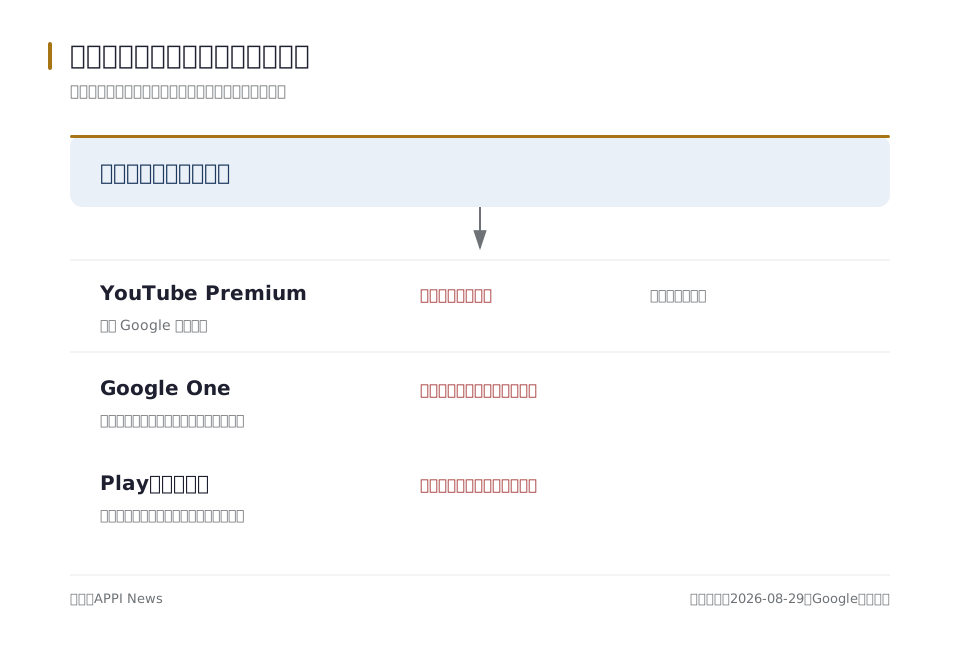
The lowest-risk sequence starts with account eligibility and ends with the services that may be lost. It treats the family roster, subscription payer and shared content as separate records.
- Check whether a family group already exists for the proposed manager's Google Account.
- Count the manager, accepted members and pending invitations against the six-person cap.
- Confirm that every participant uses a personal Google Account rather than an organization-managed account.
- Check that members live in the manager's country and identify any family-group switch during the previous 12 months.
- Record the family-group manager and any separate Google One plan manager.
- For YouTube, confirm the shared residential address; for Google Play, check each item's Family Library indicator.
- Before removal or deletion, list the shared storage, subscriptions and Family Library purchases that will stop.
A change meant only to move Google One billing does not require a new family group. A change involving the group manager, YouTube purchase control or supervised child accounts carries broader effects and should be assessed against the current account controls before deletion.
Frequently asked questions
How many people can join one Google family group?
The cap is six: one family manager and up to five members. Pending invitations count toward the limit even before they are accepted.
Does joining a Google family group activate YouTube Premium?
No. The family manager must buy a qualifying YouTube family plan, and every covered member must live at the same residential address as the manager.
Can the Google One plan manager be a different person?
Yes. Google says any adult in the family group can subscribe to Google One, and the storage plan manager does not have to control the family group.
Can a Google family manager transfer the role directly?
APPI News could not find a direct transfer procedure in Google's public English family-management pages. Those pages say the manager cannot leave and describe deletion as irreversible.
What remains after a member leaves?
The Google Account and the member's own purchases remain. Access to the family payment method, other members' Family Library items, shared Google One storage and family subscriptions stops.
Sources and further reading
- Create a family on Google(Google For Families Help)
- Join or leave a family on Google(Google For Families Help)
- Manage your family on Google(Google For Families Help)
- Sign up for & manage a YouTube family plan(YouTube Help)
- Set up & manage a YouTube family plan(Google For Families Help)
- Start or stop sharing with your family(Google One Help)
- Use Google Play Family Library(Google Play Help)
- Premium memberships available locations and travel policies(YouTube Help)
- How to change your Google Play country(Google Play Help)